Features
Everything between “I worked” and “I got paid”
Screens from the real product, then the full list of what Logsheet does.
See the real thing
These are screens from the product, shown with a demo law firm and sample data.
Time entry
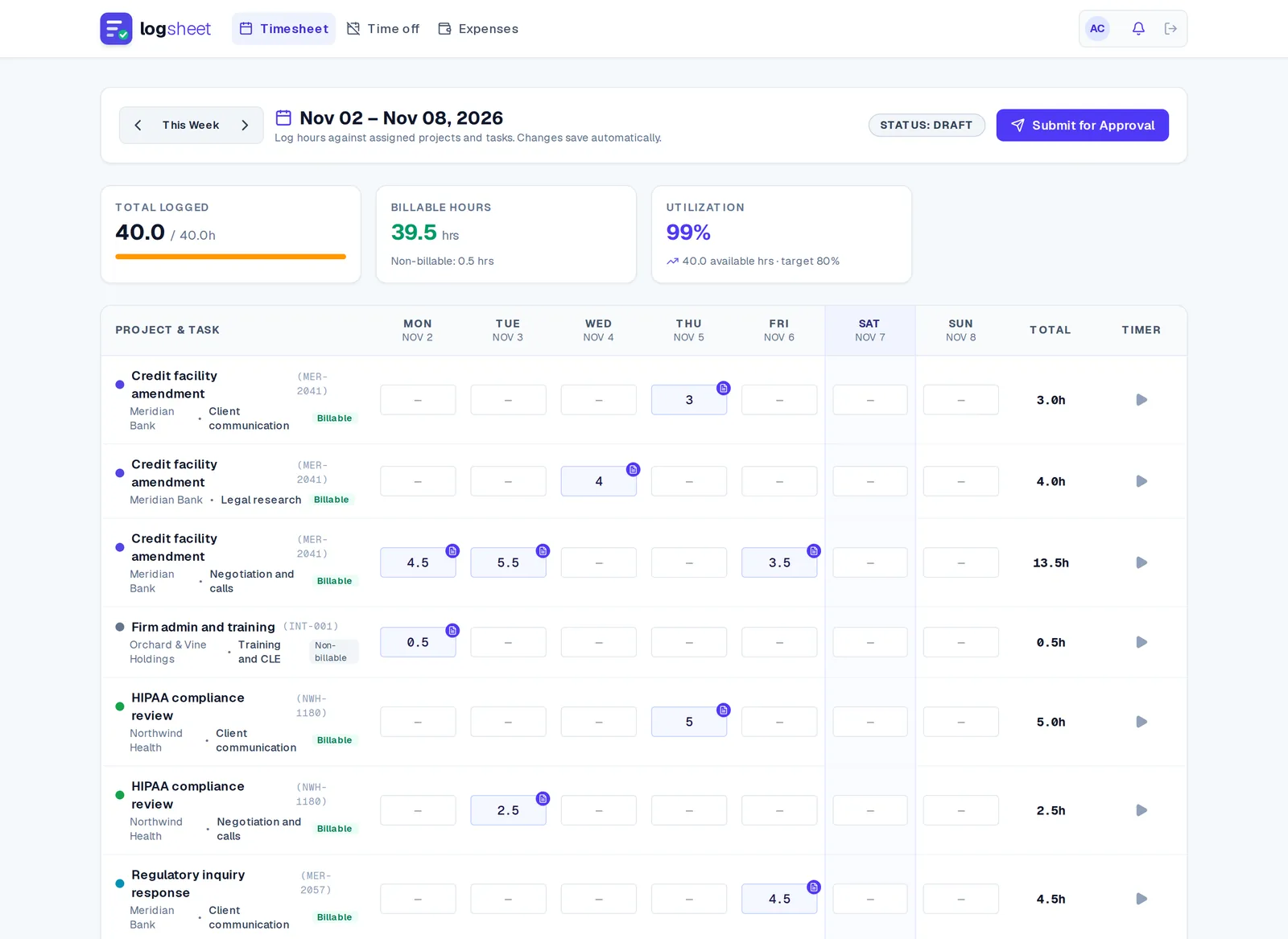
A week of hours, one screen
The weekly grid is built for speed. Type, tab and paste hours like a spreadsheet, start a timer on any row, and watch utilization and totals move as you go.
- Arrow keys, Enter and Tab move between cells
- Paste a block of hours straight from a spreadsheet
- Copy last week brings the rows across, with or without the hours
Quick add
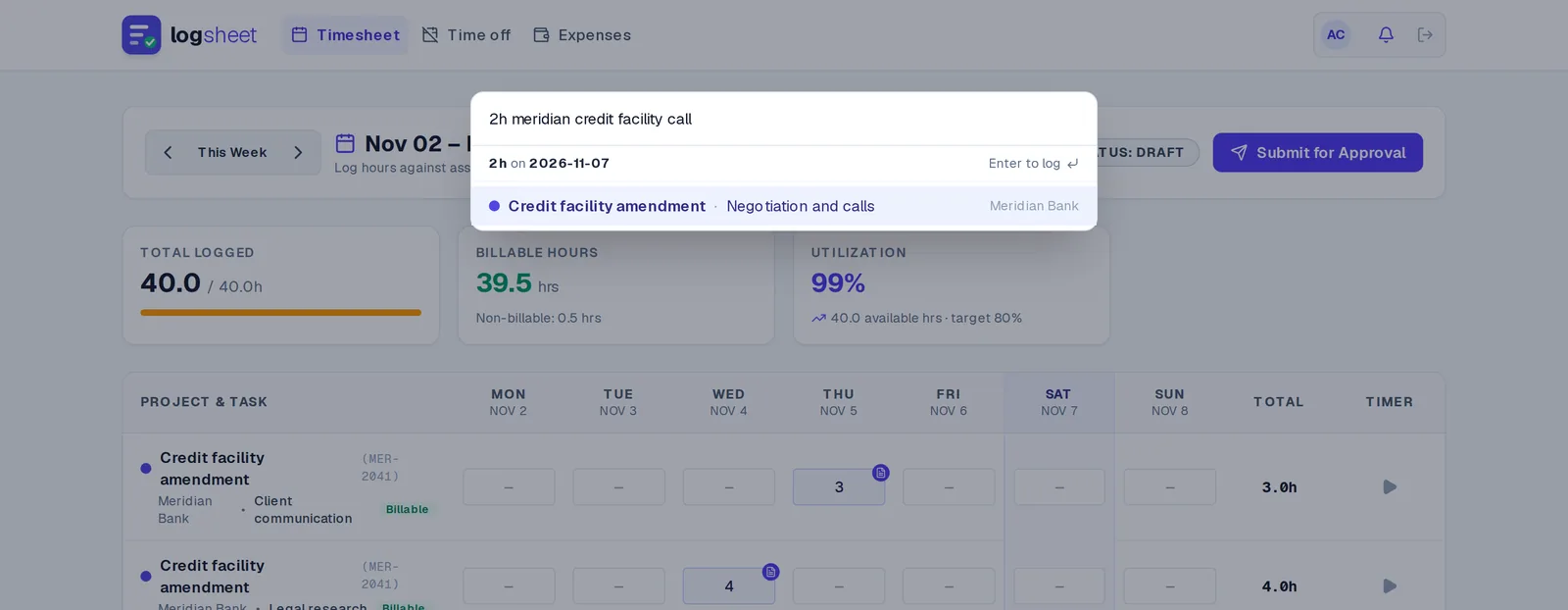
Press ⌘K (Ctrl + K on Windows) and type what you did
“2h meridian credit facility call” finds the project and task and logs it on the right day. No clicking through menus to record a phone call. Works the same on Mac, Windows and Linux.
Approvals
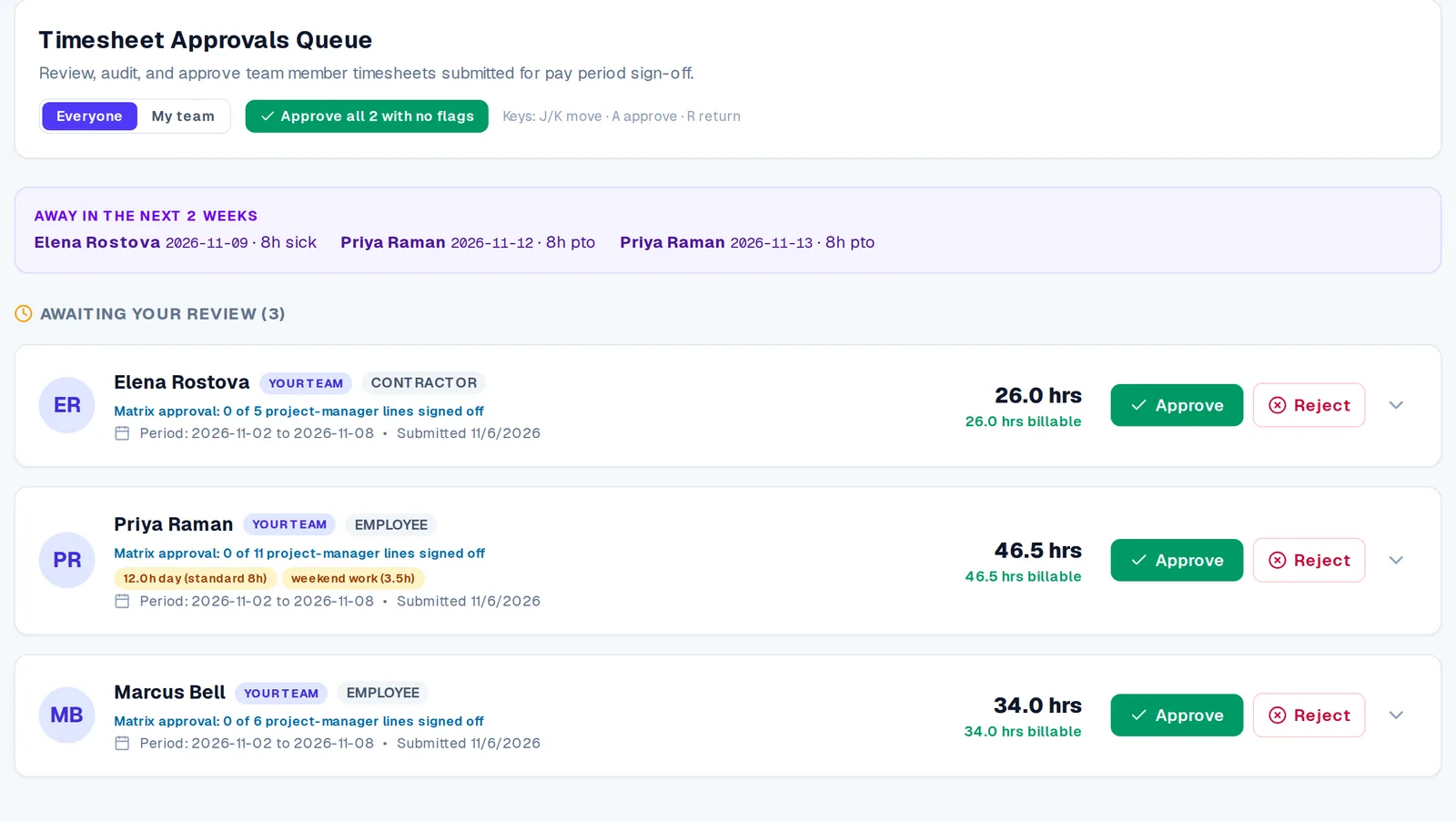
Review what matters, approve the rest in one click
Long days, weekend work and sudden swings are flagged before you open a timesheet. Clean weeks can be approved together, and anything that needs fixing goes back with a comment on the exact entry.
- “Approve all with no flags” for the weeks that need no attention
- Stand-in approvers cover while someone is away
- Who is out in the next two weeks, right on the queue
Invoicing
From approved hours to a client-ready invoice
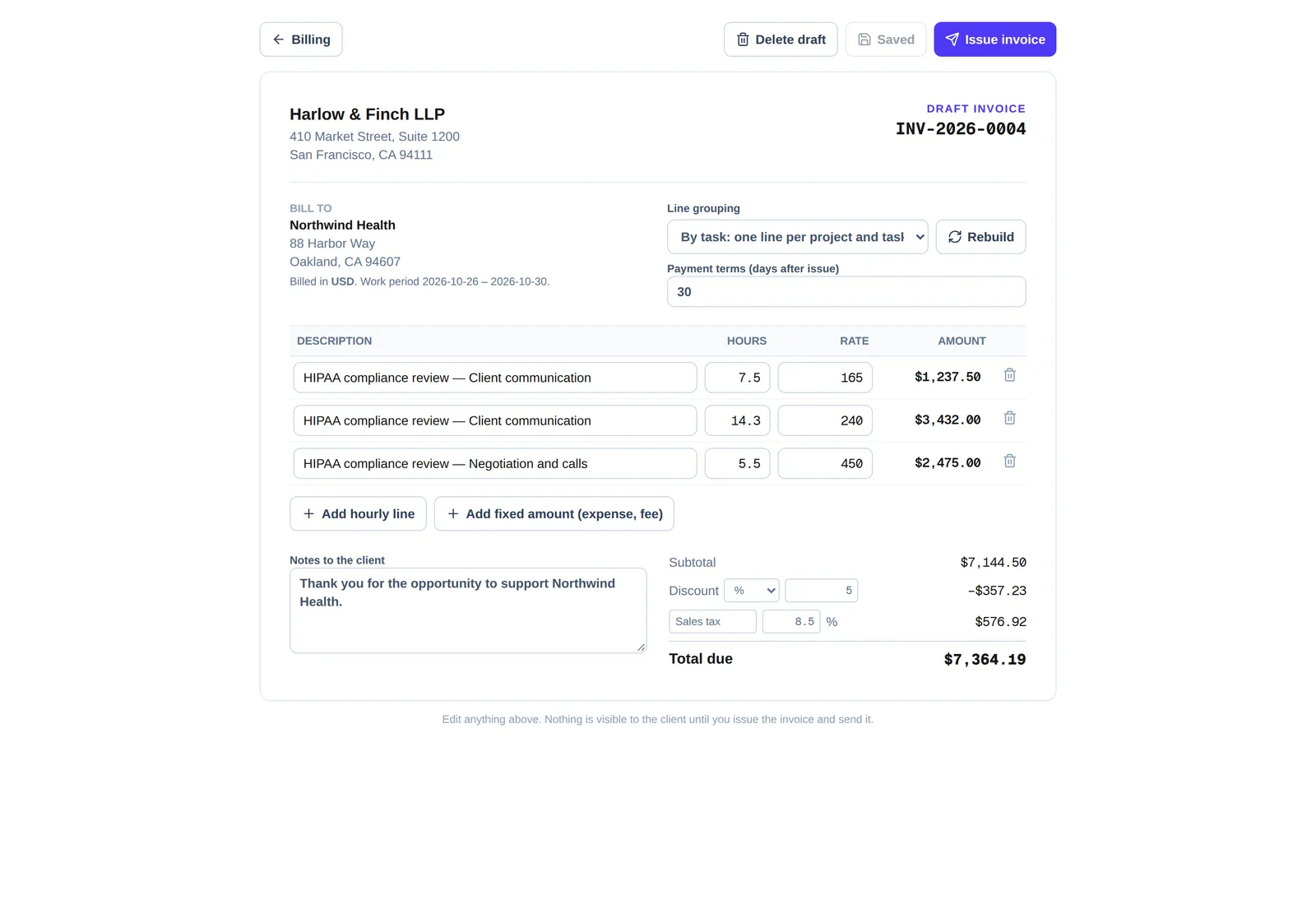
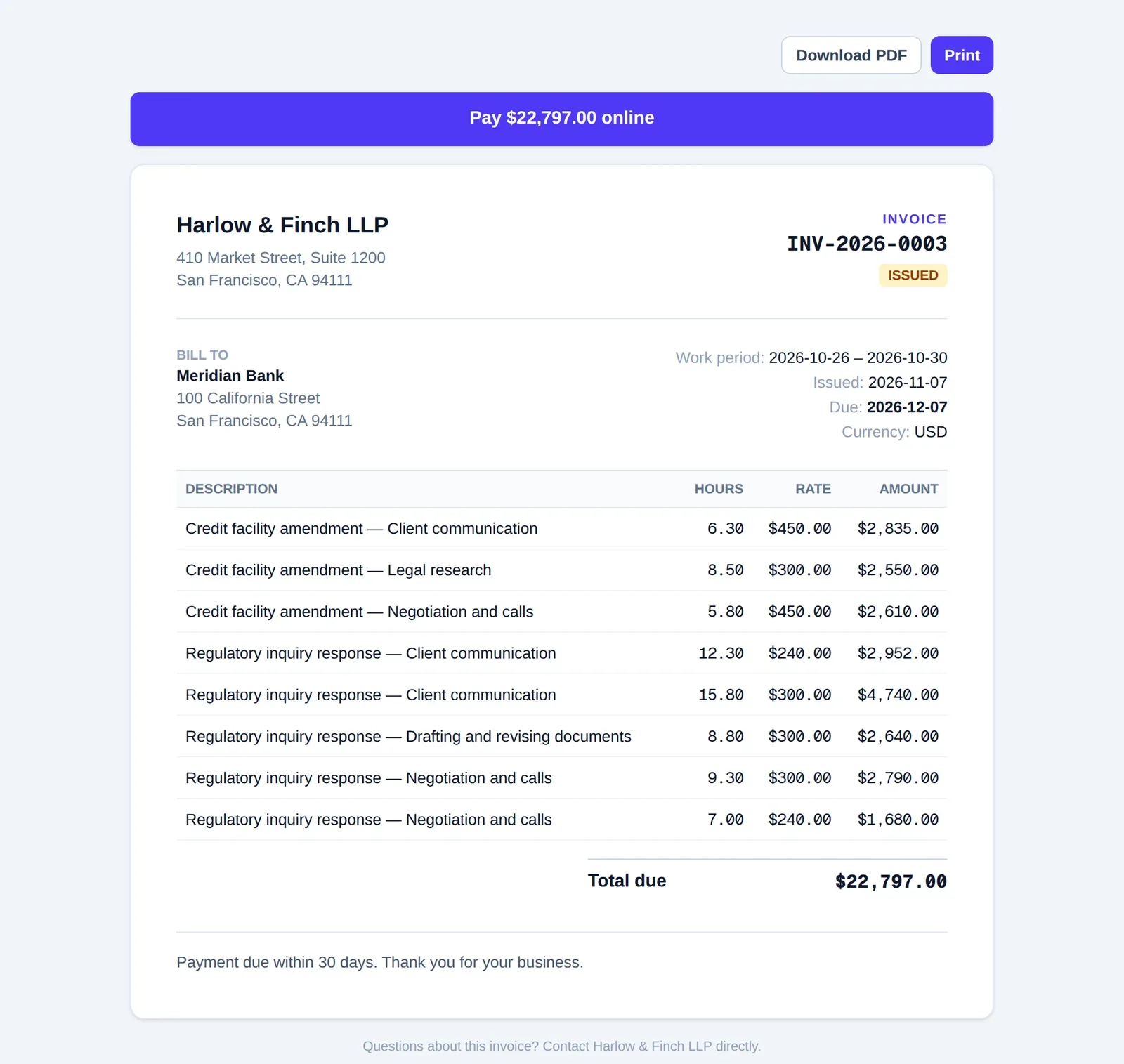
Approved, billable time becomes a draft you can edit. Add a discount and tax, change the grouping, then issue it. Your client gets a clean page they can open without an account.
- Edit lines, tax, discount, terms and notes before it goes out
- Share a private link, or email the PDF yourself
- Clients can pay by card when you connect Stripe
Reports
See utilization, margin and budget burn at a glance
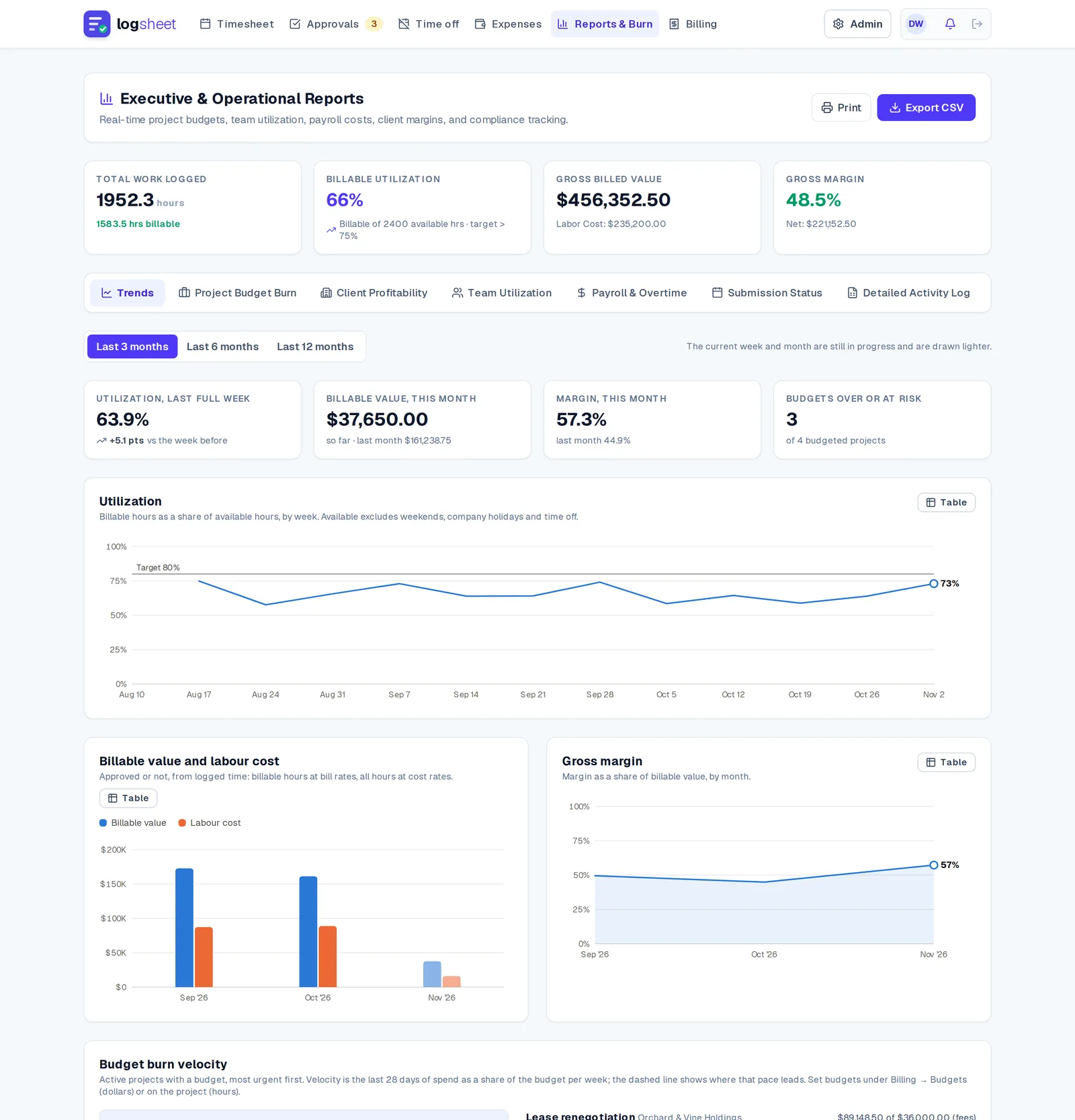
Charts show where the hours and the money are going: weekly utilization against your target, billable value against cost, and a forecast of when each budget runs out at the current pace.
Time off
Leave requests your whole team can see
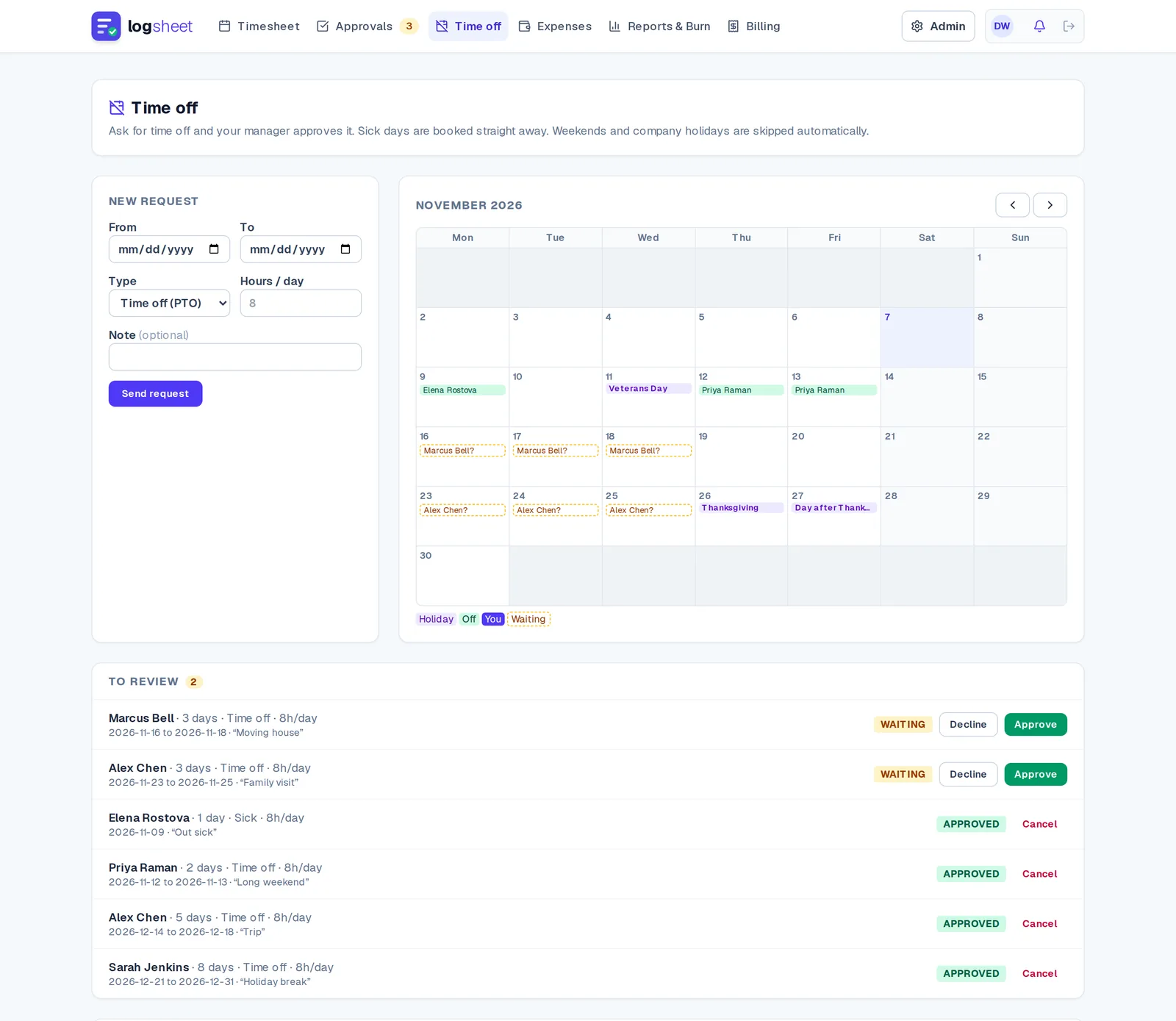
Ask for time off, get a manager decision, and see who is away on a shared calendar with company holidays marked. Approved days land on the timesheet by themselves.
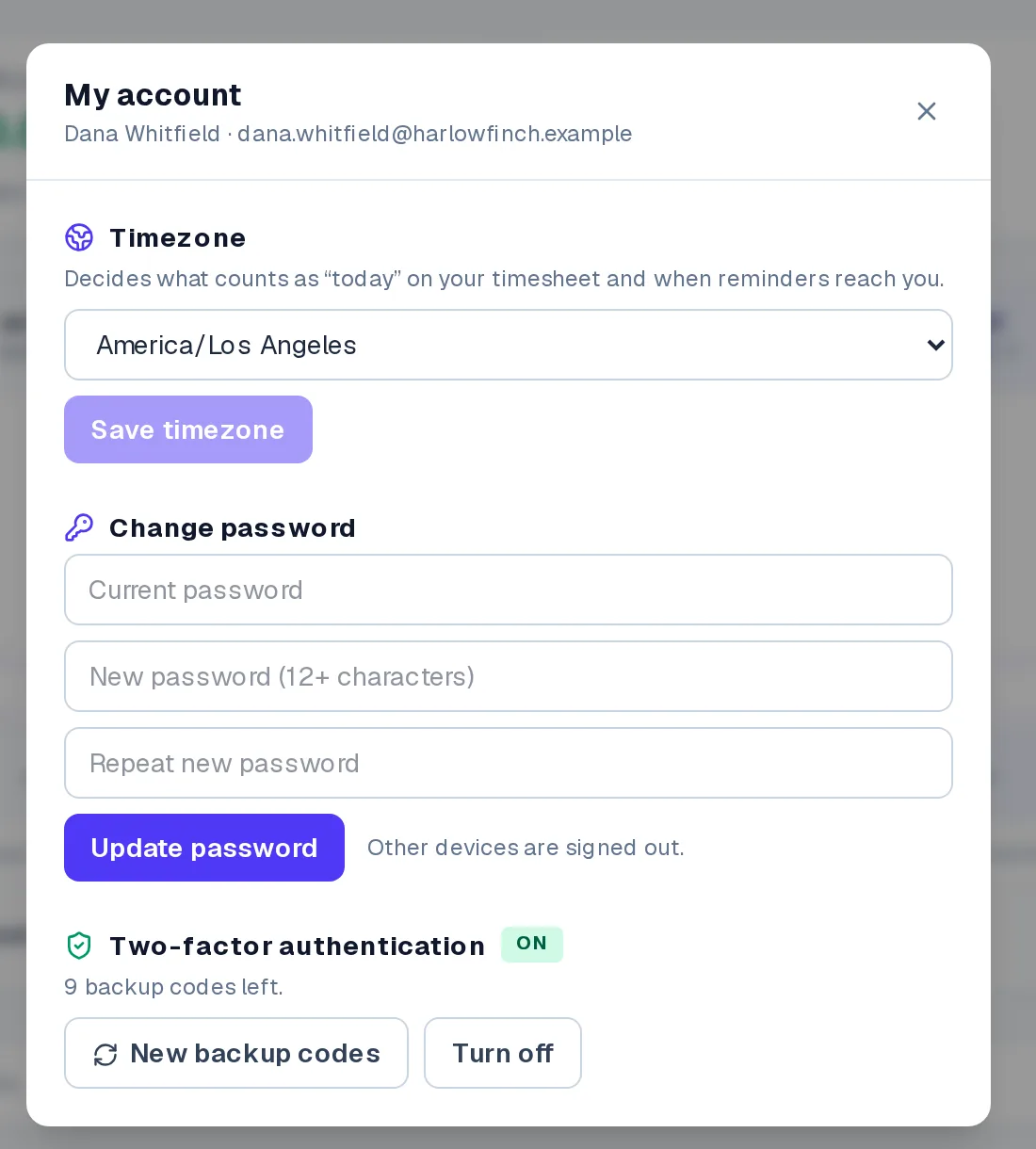
Your account
Security you set up yourself
Everyone can turn on an authenticator app, keep backup codes for a lost phone, change their password and set their own time zone. No ticket to IT.
Everything between “I worked” and “I got paid”
Log time in seconds
Press Ctrl/⌘ + K and type “2h acme migration”. Or bring last week’s projects forward, start a live timer, or turn calendar meetings into entries with one click.
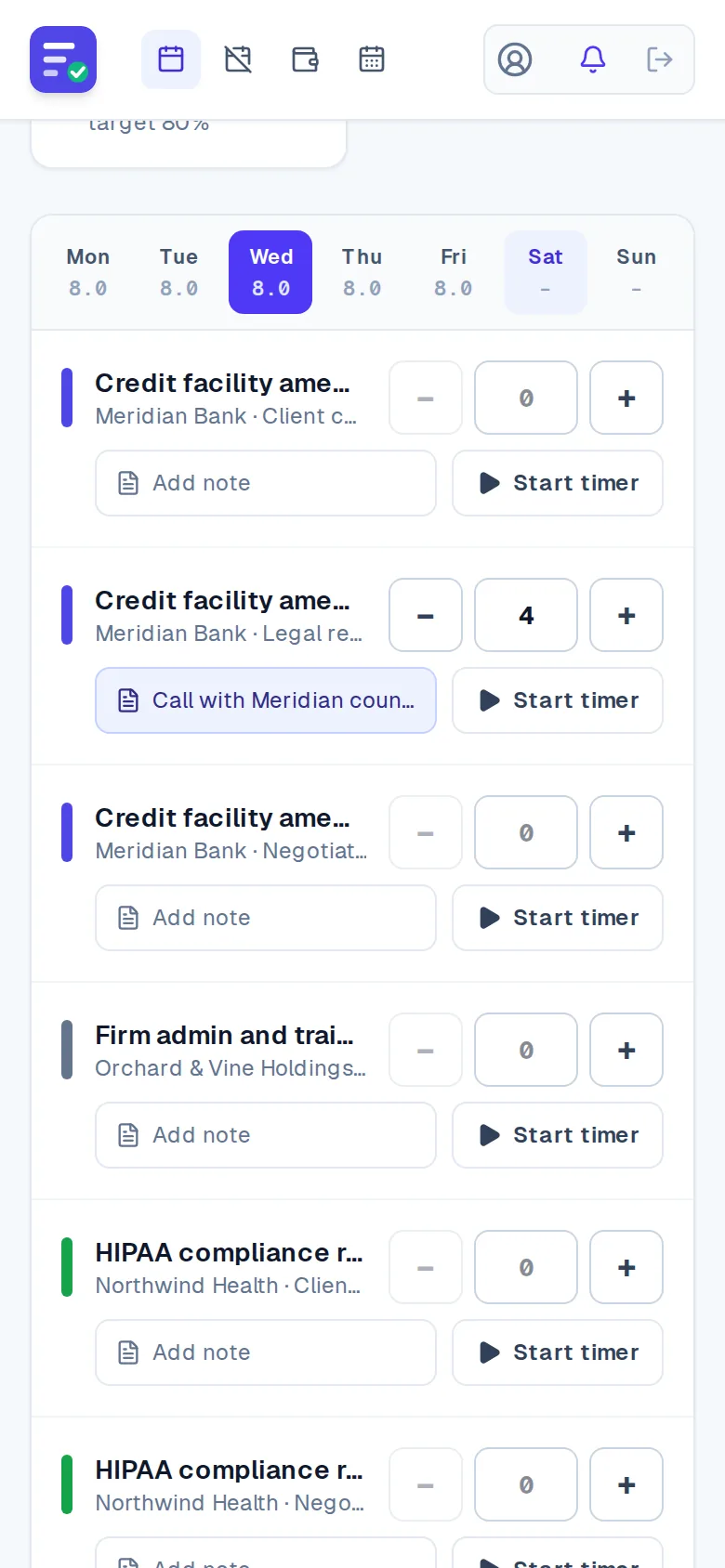
Works on a phone
A one-day-at-a-time view with big tap targets, so time gets logged when the work happens, not on Friday night.
Approvals people can actually use
Flags for long days, weekend work and sudden swings. Approve a clean week with one key, or comment on a single entry.
Approved time becomes an invoice
Approved, billable hours roll into numbered invoices. Edit the draft, add tax and discounts, bill in the client’s currency, and group lines by entry, task or one summary line. Void one and the time is free to invoice again.
Send it, share it, get paid
Email the PDF to your client from Logsheet, or share a private link they can open and download without an account. Nothing is ever sent until you press the button.
Late sheets chase themselves
A Friday nudge, a Monday follow-up, and a digest to the manager when a report is still late.
Time off that stays out of the way
Request leave, get it approved by a manager, and see who is out on a team calendar. Subscribe to a private calendar feed from your phone. Holidays show on every timesheet.
Budgets that warn you early
Alerts at 75, 90 and 100% of a project budget, in hours or dollars, so the conversation with the client happens before the overrun.
Charts, not just tables
Utilization by week, billable value, cost and margin by month, and a burn forecast that tells you when each budget runs out at the current pace.
An audit trail you can trust
Every change to a time entry is recorded in an append-only log that the database itself refuses to rewrite.
A grid that holds still
Move with the arrow keys, paste a block of hours from a spreadsheet, and keep projects in a steady order while you type. “Copy last week” brings the rows across, with or without the hours.
Your account, your security
Turn on an authenticator app yourself, keep one-time backup codes for a lost phone, and set your own time zone, all from one account screen.
Take it back before it’s approved
Submitted too soon? Withdraw the timesheet while it is still waiting for review, fix it, and submit again. The audit trail records both.
Rates that follow the project
Give a project its own hourly rate, or fall back to each person’s rate. The gross value on your timesheet updates as you log.
Access that matches your org
Managers see their own reports, stand-ins cover while someone is away, auditors get read-only reports and the audit trail, and a project can be limited to named members.
Expenses, retainers and milestones
Snap a receipt, mark it billable or reimbursable, and it flows to approval and onto the client’s invoice. Bill monthly retainers and fixed-fee milestones alongside hours, and watch dollar budgets by project and client.
Reports that answer questions
Burn, utilization, client profitability and compliance, with CSV export.
Share a project with a sub-contractor
Invite another company to log time on one of your projects. Their people keep their own accounts, timesheets and approvals. You see the hours they submit, by name and with their notes, and set one agreed rate that applies to their time automatically.
Approve their hours, then they invoice you
Turn on approval per project and approve or return a sub-contractor’s hours with a comment. Only approved hours can go on their invoice to you, and you open each invoice from a link. Their hours count against your project budget at the agreed rate, and a shared activity log records every step.
Partners start free
A sub-contractor with no Logsheet account can create a free one from your invitation, log time on your project and invoice you at no cost. Using Logsheet for their own projects and colleagues needs a plan. Sharing a project is part of Team and above.
Bring your history across
Import time from Harvest, Toggl or Clockify exports (or any CSV with a date, a project and hours). Logsheet checks the file first and tells you who is missing, then you see a preview. Entries arrive as drafts, nothing existing is overwritten, weeks that are already submitted are left alone, and big files are sent in parts.
Payments, balances and polite reminders
Record part payments and see what is still owed on the invoice. Your billing team is told when an invoice goes overdue, and you send the client a reminder with one click. Nothing is ever emailed to a client unless you press the button.
An inbox for what needs you
Approvals, returned timesheets, partner hours and reminders also appear in a notification inbox in the header, with a link to the right screen. Security emails never go there.
A guided start
A short setup checklist walks an admin from company details to a first invoice, with optional sample data you can remove in one click. Logsheet also points out a working day with no time before you submit, and missing company details before your first invoice.
An API and signed webhooks
Read projects, clients, time and invoices with an API key, and log time from your own tools. Webhooks tell you when a timesheet is submitted, approved or returned and when an invoice is issued or paid, each signed so you can trust it. Available on Team and above.
Capacity planning
Plan hours per person per project for the weeks ahead and see them against what each person can actually work, after holidays and time off, with the hours already logged beside the plan.
Log time from Slack
Type “/log 2h acme migration yesterday” in Slack. Logsheet finds the project, adds the hours under the same rules as your timesheet, and replies only to you. Part of Firm.
Install it, pop out the timer
Add Logsheet to your phone or desktop like an app, and open the timer in its own small window so it stays visible while you work. Weekly or monthly summary emails are there for the people who want them.
Team plan and above · Coming soon
Your calendar already knows where the week went
Connect Google and Outlook on any plan, even several accounts each, and turn meetings into time entries instead of reconstructing them on Friday. You can also import an .ics file from any calendar app.
Connect every calendar
Link Google and Outlook accounts side by side: work, personal, a client’s. Choose which calendars count and give each a default project.
Review the week’s meetings
Your meetings appear next to your timesheet with hours per day. Projects are suggested from how you logged the same meeting before. Log one, log them all, or hide the noise.
Put your time back on the calendar
Optionally show logged time as busy blocks that fit around your meetings, and add a weekly “submit your timesheet” reminder. Switch it off and Logsheet removes what it added.
Private by design
Only titles and times are stored, private events show as “Busy”, and managers and admins cannot see your calendar, only the entries you save. Disconnect and it all goes.
Writing to calendars is off until you and your organisation's admin turn it on. See our privacy policy for exactly what is stored.
Try it with your own week
Plans from $8 a month. Solo, Team, Firm and Enterprise.